Game guide · XJBILLIARDS
The Breakthrough playbook
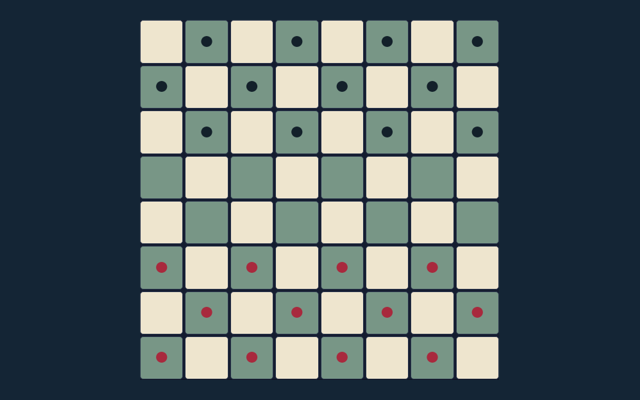
Read the position before choosing your next action. Reach the opposite back row with one of your pieces, or capture all opposing pieces. Try the rule on the board, then read the next instruction. Each player begins with sixteen pieces on the nearest two rows of an 8×8 board. Try the rule on the board, then read the next instruction.
8×8 board, sixteen pieces per side, basic local computer strategy and same-device play. No promotion, castling or remote multiplayer.
Try a more deliberate round
Take a moment to check the current turn. Capture only one square diagonally forward. Straight captures and backward moves are not allowed.
The objective of a round
Take a moment to check the current turn. Reach the opposite back row with one of your pieces, or capture all opposing pieces.
Step by step
- Each player begins with sixteen pieces on the nearest two rows of an 8×8 board.
- Blue moves upward and red downward. Move one square straight or diagonally forward into an empty square.
- Capture only one square diagonally forward. Straight captures and backward moves are not allowed.
- Reach the farthest row with any piece, or remove all opposing pieces, to win. Captures are optional.
- Choose a computer opponent or two players on the same device. New round resets the board.
Making selections and moves
Take a moment to check the current turn. Tap one of your pieces, then a highlighted destination. Select a different piece to change your choice. Start a new round when you are ready to try again.
A closer look at one example
The example and rules describe the same game you can play above. A blue piece can advance straight into an empty square or diagonally forward into an empty or red-occupied square. Start a new round when you are ready to try again.
Where a round can go wrong
Take a moment to check the current turn. Breakthrough pieces are not chess pawns: diagonal moves into empty squares are legal, and there is no initial two-square move. Keep the goal in mind before your next move.
Read these answers for extra help
What is the aim of Breakthrough?
Reach the opposite back row with one of your pieces, or capture all opposing pieces. A new round resets the current game.
When I start, how do the controls work?
Tap one of your pieces, then a highlighted destination. Select a different piece to change your choice. Use the labelled controls for your next action.
On this page, can you show an example?
A blue piece can advance straight into an empty square or diagonally forward into an empty or red-occupied square. Keep the current game state in view while applying this rule.
Which mistake should I avoid?
Breakthrough pieces are not chess pawns: diagonal moves into empty squares are legal, and there is no initial two-square move. A new round resets the current game.
What rules and limits are used here?
8×8 board, sixteen pieces per side, basic local computer strategy and same-device play. No promotion, castling or remote multiplayer. A new round resets the current game.
On this page, how many people can play here?
Computer or same-device 2 players. This is local browser play, not internet matchmaking. The controls work with mouse or touch.
On this page, can I move diagonally without capturing?
Yes. A diagonally forward empty square is a legal destination. The controls work with mouse or touch.
For this game, can I capture straight ahead?
No. Captures must be diagonally forward. Scores here do not represent cash or prizes.
Is capturing compulsory?
No. You may choose any legal move. The game is played locally in your browser.
What wins the round?
Reaching the opponent’s back row with one piece, or capturing every opposing piece. You can start a new round from the game controls.